二:SSO 单点登入

二:SSO 单点登入

欲速则不达

Why 单点登入?

一次登入,到处畅行!

前面我们讲了水平扩容多机部署时Session一致性的解决方案!在我们公司日常开发中一般不止一个应用如:商品 / 订单 / 客户 这些模块都要有登入!我们是不是可以讲登入做成模块形式来统一管理呢??
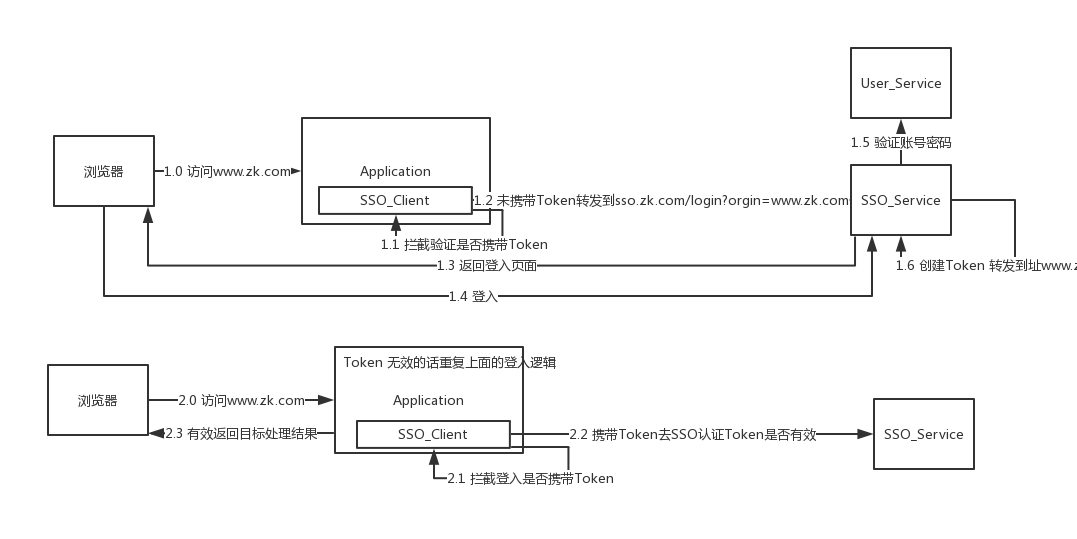
SSO大概流程模块划分图

通过上图可知我们分为3大块

  • SSO-Client

  • SSO-Service

  • User-Service

SSO-Client

主要做登入拦截,这个是做成Jar包的方式集成进目标应用。

  • 拦截方式

    • javax.servlet.Filter servlet 过滤器方式

    • org.springframework.web.servlet.HandlerInterceptor Spring拦截器方式

SSO-Service

主要用于登入,身份认证!一些常用信息存储等。

User-Service

需要登入的话必然我们就需要用户信息相关操作的!其实是作为一个单独作为一个依赖服务的。


Why 同域和跨域?

这是浏览器为了安全的一种保护行为!**跨域资源调度限制**。你可以试着考虑下,你先登入www.taobao.com,然后再登入 www.baidu.com。 难道你要把淘宝域名下的cookie发送给百度的服务器吗? 

但是我们正常的开发中可能一个公司内部有多个系统多个域名,我们需要打通的各个系统的登入。这时候我们就面临新的挑战了! **跨域**

同源策略:

协议 | 域名 | 端口 都要相同,不然就会产生跨域问题

URL 说明 是否跨域
http://www.taobao.com/item http://www.taobao.com/user 相同协议,域名,端口
http://www.taobao.com/item/app.js http://www.taobao.com/user/defult.js 相同协议,域名,端口 不同资源
http://www.zk.com:8080 http://www.zk.com:8083 相同协议,域名 不同端口
http://www.zk.com:8080 https://www.zk.com:8080 相同域名,端口 不同协议
http://127.0.0.1:8080 http://www.zk.com:8080 如果该域名指向的就是该IP 也是跨域了
http://www.zk.com:8080 http://user.zk.com:8080 主域和子域
http://www.baidu.com http://www.taobao.com 不同域名

跨域解决方案:

  • JSONP: 这个方案只支持GET请求,遇到携带信息量较大的话会带来一些性能问题。暂时我没有详细研究,大家感兴趣可以自行研究。优点是支持比较老得浏览器!

  • CORS: 全称 跨域资源共享 注意:这个需要浏览器和服务器同时支持。除了一些微软系列比较老得浏览器,现在市面谷歌,火狐,猎豹啊的都支持的。莫名打了广告哈哈😅。

  • … 其他方案网上给出来的总共8种吧,应用我觉得主要就是以上两种。

    好滴,接下来我们来讲讲 CORS !

两种请求:

浏览器会将CORS请求分为:**简单请求**(simple request) 和  **非简单请求**(not-so-simple request)
  • 简单请求: 需要满足两大条件

    • 请求方法:三种之一就好!

      • HEAD

      • GET

      • POST

    • 请求字段:不超出以下几种字段。

      • Accpet : 代表发送端希望接收的数据类型(媒体类型资源)

      • Accpet-Language:代表客户端希望接收的语言类型

      • Content-Language:代表发送端的语言类型

      • Last-Event-ID:

      • Content-Type: 代表发送端的数据类型(媒体类型资源),只限三个值!

        • application/x-www-form-urlencoded

        • multipart/form-data

        • text/plain

  • 非简单请求: 会在正式请求之前增加一个预检查请求(options 类型)注意需要配置文件web.xml开启这个请求类型!收到请求后才会执行真正的操作。

上硬菜 代码: springBoot项目

1
2
3
4
5
6
7
8
9
10
11
12
13
14
15
16
17
18
19
20
21
22
/**
* web配置
*
* @author zhoukun
*/
@Configuration
public class WebConfig implements WebMvcConfigurer {
@Override
public void addCorsMappings(CorsRegistry registry) {
registry.addMapping("/**")
//授权的访问源
.allowedOrigins("*")
//允许的请求动词
.allowedMethods("POST, GET, OPTIONS, DELETE")
//预检授权的有效期,单位:秒
.maxAge(3600)
//额外允许访问的响应头
.allowedHeaders("x-requested-with")
//是否允许携带
.allowCredentials(true);
}
}

估计你们肯定会想就这么简单吗? 我想说是的。还是扩展性更强的写法。

配置详解:

  • Access-Control-Allow-Origin 必填: 必填 授权访问资源 * 表示所有资源可以访问。你也可以填写一个具体的域名

  • Access-Control-Allow-Methods 必填: 允许跨域的方法 如POST, GET …

  • Access-Control-Max-Age: 预授权(非简单请求的预检查)的有效期,有效期内不用在发送一条检查请求。

  • Access-Control-Expose-Headers: 额外允许访问的响应头 CORS请求时,XMLHttpRequest对象的getResponseHeader()方法只能拿到6个基本字段:Cache-Control、Content-Language、Content-Type、Expires、Last-Modified、Pragma。如果想拿到其他字段,就必须在Access-Control-Expose-Headers里面指定。

  • Access-Control-Allow-Credentials: 是否允许携带cookie ,默认不携带,我们在Cookie存储Token肯定是需要的!

我肯定写的比较分散 有点像矮大紧想到哪里,就讲到哪里呢! 大家不要在意这些细节,我收回来。


代码实现SSO!
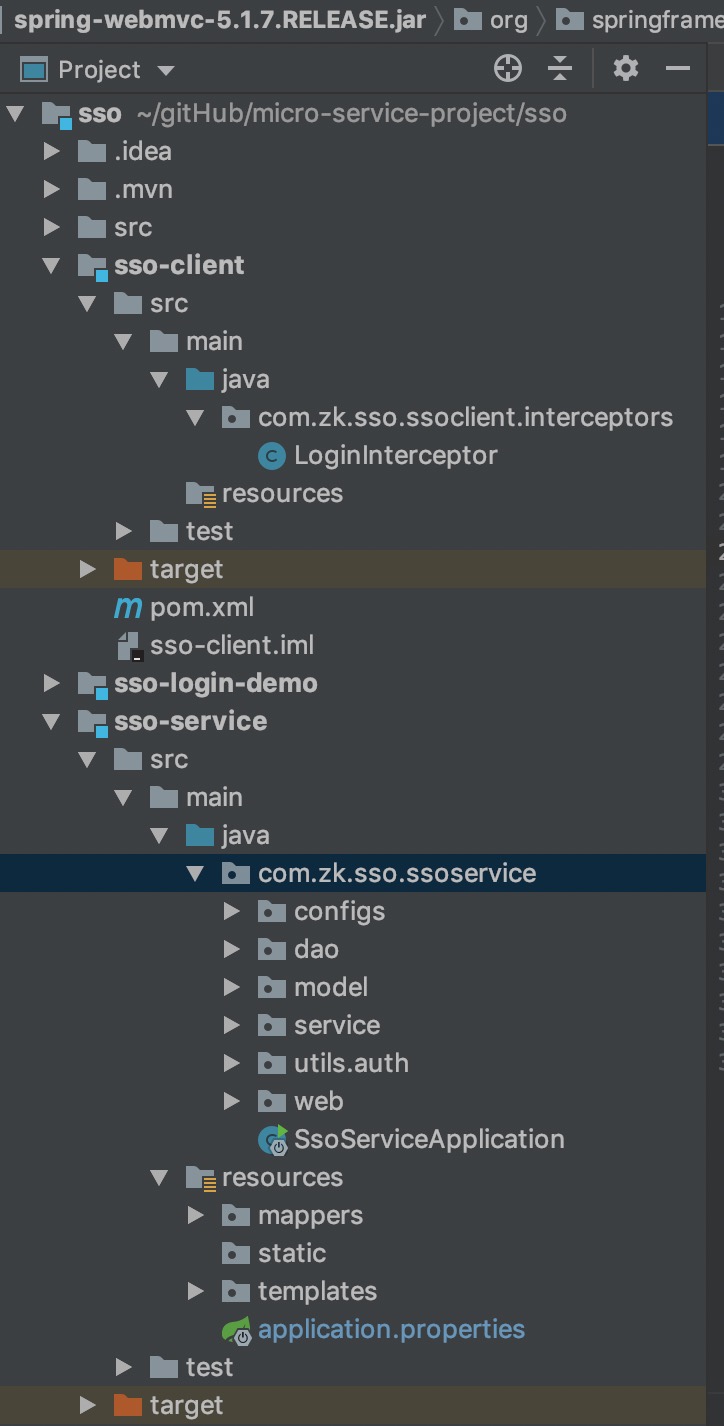
sso目录结构

SSO-Client: 代码

  1. 新建Spring-Boot 工程!名字sso, 创建子模块sso-client

  2. pom.xml

    1
    2
    3
    4
    5
    6
    7
    8
    9
    10
    11
    12
    <dependencies>
    <dependency>
    <groupId>org.springframework.boot</groupId>
    <artifactId>spring-boot-starter-web</artifactId>
    </dependency>
    <!-- http客户端 -->
    <dependency>
    <groupId>org.apache.httpcomponents</groupId>
    <artifactId>httpclient</artifactId>
    <version>4.5.9</version>
    </dependency>
    </dependencies>
  3. 新建拦截器 我这里选用的Interceptor方式

1
2
3
4
5
6
7
8
9
10
11
12
13
14
15
16
17
18
19
20
21
22
23
24
25
26
27
28
29
30
31
32
33
34
35
36
37
38
39
40
41
42
43
44
45
46
47
48
49
50
51
52
53
54
55
56
57
58
59
60
61
62
63
64
65
66
67
68
69
70
71
72
73
/**
* 登入拦截
*
* @author zhoukun
*/
@Component
public class LoginInterceptor implements HandlerInterceptor {
private static final String OK = "ok";

@Override
public boolean preHandle(HttpServletRequest request, HttpServletResponse response, Object handler) throws Exception {
String token = request.getHeader("token");
if (StringUtils.isEmpty(token)) {
token = request.getParameter("token");
}
if (StringUtils.isEmpty(token)) {
Cookie[] cookies = request.getCookies();
if (cookies != null && cookies.length > 0) {
for (Cookie cookie : cookies) {
if (cookie.getName().equals("token")) {
token = cookie.getValue();
}
}
}
}
String originUrl = request.getRequestURL().toString();
if (StringUtils.isEmpty(token)) {
response.sendRedirect("http://127.0.0.1:2080?originUrl=" + originUrl);
return false;
}
// if (!StringUtils.isEmpty(token)) {
// Cookie cookie = new Cookie("token", token);
// cookie.setDomain("zk.com");
// response.addCookie(cookie);
// }
Map<String, String> map = new HashMap<>();
map.put("token", token);
String result = httpClientGet(map);
if (OK.equalsIgnoreCase(result)) {
return true;
} else {
response.sendRedirect("http://127.0.0.1:2080?originUrl=" + originUrl);
return false;
}
}


public static String httpClientGet(Map<String, String> map) throws URISyntaxException, IOException {
CloseableHttpClient httpClient = HttpClientBuilder.create().build();

List<NameValuePair> params = new ArrayList<>();
map.forEach((k, v) ->
params.add(new BasicNameValuePair(k, v))
);

URI uri = new URIBuilder().setScheme("http").setHost("localhost")
.setPort(2080).setPath("/auth/token")
.setParameters(params).build();

HttpGet get = new HttpGet(uri);
CloseableHttpResponse response = httpClient.execute(get);

HttpEntity responseEntity = response.getEntity();
System.out.println("响应状态为:" + response.getStatusLine());
String result = EntityUtils.toString(responseEntity);

httpClient.close();
response.close();
return result;

}

}

SSO-Service 代码:

  1. sso 下面新建子工程 sso-servie

  2. 编写jwt 工具类上篇文章已经介绍过了这里就不多讲

  3. pom.xml

1
2
3
4
<dependency>
<groupId>org.springframework.boot</groupId>
<artifactId>spring-boot-starter-web</artifactId>
</dependency>

4.编写 登入类

1
2
3
4
5
6
7
8
9
10
11
12
13
14
15
16
17
18
19
20
21
22
23
24
25
26
27
28
29
30
31
32
33
34
35
36
37
38
39
40
41
42
43
44
45
46
47
/**
* 登入页面
*
* @author zhoukun
*/
@Controller
public class LoginController {

@Autowired
private UserService userService;

@GetMapping("/")
public String form(HttpServletRequest request, HttpServletResponse response) {
String originUrl = request.getParameter("originUrl");
request.getSession().setAttribute("originUrl", originUrl);
return "login";
}

@GetMapping("/login")
@ResponseBody
public String login(HttpServletRequest request, HttpServletResponse response,
@RequestParam("username") String username, @RequestParam("password") String password) throws IOException {
if (StringUtils.isEmpty(username)) {
return "username not null";
}
if (StringUtils.isEmpty(password)) {
return "password not null";
}

UserDo userDo = userService.verifyUser(username, password);
if (userDo == null) {
return "密码或者账号错误!";
}
Map<String, String> claims = new HashMap<>();
claims.put("id", String.valueOf(userDo.getId()));
claims.put("username", userDo.getUserName());
LocalDateTime exprieLocalDateTime = LocalDateTime.now().plusMinutes(10L);
ZonedDateTime zonedDateTime = exprieLocalDateTime.atZone(ZoneId.systemDefault());
String token = JwtUtil.generateToken(claims, Date.from(zonedDateTime.toInstant()));
Cookie cookie = new Cookie("token", token);
response.addCookie(cookie);
response.setHeader("token", token);
String originUrl = (String) request.getSession().getAttribute("originUrl");
response.sendRedirect(originUrl + "?token=" + token);
return token;
}
}
  1. 认证类
1
2
3
4
5
6
7
8
9
10
11
12
13
14
15
16
17
18
19
20
21
22
23
24
25
26
/**
* 认证Token
*
* @author zhoukun
*/
@RestController
@RequestMapping("auth")
public class AuthTokenController {
public static final String OK = "OK";
public static final String FAIL = "FAIL";


@GetMapping("token")
public String authToken(HttpServletRequest request, HttpServletResponse response) {
String token = request.getParameter("token");
try {
Map<String, String> map = JwtUtil.verifyToken(token);
return OK;
} catch (Exception e) {
e.printStackTrace();
return FAIL;
}
}


}

小叙:

这个是一个比较简单的实现很多地方都不不是特别验证,比如跨域携带, jwtToken实时刷新等等问题,都没有解决 这个这是打个样,我们什么都是从简单到深入,踩很多坑和雷的。接下的文章会更加深入探讨这些问题的。